




HexGL: Futuristic WebGL Anti-Gravity Speed Racing
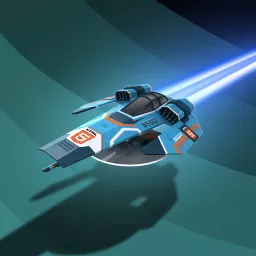
HexGL is a breathtaking, futuristic anti-gravity racing simulation built by Thibaut Despoulain in pure WebGL and JavaScript. Serving as a passionate tribute to legendary sci-fi racers like Wipeout and F-Zero, HexGL pushes browser 3D graphics to astonishing heights.
Pilot a sleek, hover-craft racing ship through floating cybernetic track loops, soaring banked curves, and neon city canyons at speeds well over 400 km/h. Master airbrakes to negotiate tight hairpin turns without colliding with high-voltage track barriers.
Hit glowing track booster pads to trigger supersonic speed bursts, manage ship shield integrity against wall friction, and shave milliseconds off your qualifying times to conquer the global leaderboard.
How to play HexGL
- Use Up Arrow or W to accelerate and Down Arrow or S to brake.
- Steer with Left and Right Arrow keys or A and D.
- Press Q and E to activate left and right airbrakes for sharp cornering at high speeds.
- Drive across glowing blue and purple chevron pads on the track surface for massive velocity boosts.
Tips for winning and high scores
- Master the airbrakes: tapping Q or E while turning allows you to carve through sharp bends without losing forward speed.
- Avoid scraping track barriers; wall collisions deplete your ship's shield meter and can destroy your craft.
- Hit every boost chevron pad on straightaways to reach maximum supersonic velocity.
- Adjust graphic fidelity settings in the pause menu if running on school Chromebooks for smooth 60 FPS performance.
3D WebGL Rendering & Chromebook Performance
Hex Gl relies on hardware-accelerated HTML5 and WebGL 3D graphics to keep high-speed obstacles and camera movement locked at a smooth 60 frames per second. Fast visual reaction time and spatial judgment matter at higher speeds, so the browser build is optimized to minimize input lag and RAM consumption on school Chromebooks, laptops, and classroom Wi-Fi connections.
Frequently asked questions
Is Hex Gl free to play?
Yes, Hex Gl is 100% free to play directly in your web browser on Blooket1 with no downloads, plugins, or sign-ups required.
Does Hex Gl run well on school Chromebooks?
Yes! It uses hardware-accelerated HTML5 and WebGL rendering designed to run smoothly at 60 FPS on managed school Chromebooks, Windows laptops, MacBooks, and tablets.
Is my game progress saved automatically?
Yes, your high scores, unlocked levels, and settings are saved automatically in your browser's local storage so you can pick up right where you left off.
How do I play if my school blocks this page?
Click the Stealth mode button in the top navigation bar to disguise your browser tab as Google Docs, Google Drive, or Classroom, launch Hex Gl inside an about:blank tab, or switch to one of our official alternate links like blooket1.pages.dev or educational.blooket1.com. You can also check our Guides & Tier Lists for more tips.